Spring Modulith in Practice: Refactoring a Food Delivery Monolith into a Modular Architecture
As I was diving into microservice patterns, I decided to revisit an old side-project: a Food Delivery System. My goal was a full migration to a distributed architecture.
However, I quickly hit a wall. Migrating a “Big Ball of Mud” directly to microservices doesn’t solve complexity; it just adds network latency and infrastructure costs to it. I decided to take a strategic “bridge” step: the Modular Monolith.
A Modular Monolith allows you to build microservices-style boundaries while maintaining a single deployment unit. To enforce these boundaries, I turned to Spring Modulith.
Spring Modulith: The Architectural Compiler
Spring Modulith is handy for building modular monolith applications. You start by thinking about making your code into Bounded Contexts or modules and Spring Modulith serves as your architectural unit tests. But first, what’s Spring Modulith?
Spring Modulith is an opinionated framework (contains multiple libraries) that helps developers to structure their applications as Modular Monolith with clear and defined business modules. It helps with enforcing structural validation, observe module interactions at runtime and implement communication in a loosely coupled way.
The Refactor
I started by consolidating my packages into logical Bounded Contexts. This meant looking past the code and connecting the business dots.
For example, my original restaurants package was bloated. It contained cuisine, menu, item, and itemSpec. Since a Menu or an Item cannot exist without a Restaurant, they share the same lifecycle so I grouped them into a single module: Catalog.
However, deliveryFee was different. Fees are related to logistics and distance, not the food itself. I extracted that into a Shipping module. This is the essence of right-sizing: grouping what changes together and separating what doesn’t.
So we managed to construct our modules, now we need to validate the new architecture, so let’s jump into Spring Modulith and add it to the pom.xml
<dependencyManagement>
  <dependencies>
    <dependency>
      <groupId>org.springframework.modulith</groupId>
      <artifactId>spring-modulith-bom</artifactId>
      <version>2.0.5</version>
      <scope>import</scope>
      <type>pom</type>
    </dependency>
  </dependencies>
</dependencyManagement>
Notice that Spring Modulith consists of multiple libraries but as a start, we can ignore adding them individually to the pom.xml file and just add this BOM.
Let’s add a verification test to verify our architecture:
@Test
  void verifyModularity() {
    // Creates a model of your app based on package structure
    ApplicationModules modules = ApplicationModules.of(FoodDeliverySystemApplication.class);


    modules.forEach(System.out::println);
    modules.verify();
  }
You’d notice ApplicationModules object. This modules object is in-memory representation of the app module arrangement derived from the codebase. They can be used to print the whole module to the console, or most importantly, verify whether you have fully migrated to a modular monolith.
A module’s internal organization
A module can be organized in a couple of ways and depending on the way you choose, you have to define the rules of exposing the classes/interfaces you want to expose.
So let’s explore different types of Application Module types and see which one I’ve selected. The types are:
1. Simple Application Module
A module that consists of a single package with no sub-packages.
- API: All
publicclasses in the package. - Internal: There is no sub-package to hide code in, so you must use package-private visibility (remove the
publickeyword) to hide implementation details.
File Structure:
com.joe.fooddelivery
└── shipping (Simple Module)
    ├── DeliveryService.java (public - API)
    ├── DeliveryRepository.java (package-private - Hidden)
    └── DeliveryEntity.java (package-private - Hidden)
Code Example:
package com.joe.fooddelivery.shipping;

// Hidden from other modules because it's not public
class DeliveryEntity { ... }

// Accessible to other modules
public interface DeliveryService { ... }
2. Advanced Application Module
The standard recommended type. It uses sub-packages to organize code.
- API: Only the classes in the root of the module package (e.g.,
catalog). - Internal: Anything inside sub-packages (e.g.,
catalog.internal) is strictly hidden by Spring Modulith, even if the classes are markedpublic.
File Structure:
com.joe.fooddelivery
└── catalog (Advanced Module)
    ├── CatalogService.java (Public API)
    └── internal (Hidden from everyone else)
        ├── RestaurantEntity.java (public, but Modulith hides it)
        ├── MenuRepository.java
        └── PriceCalculator.java
Code Example: Spring Modulith verification will fail if OrderService tries to import RestaurantEntity.
// In orders module - THIS WILL FAIL TEST
import com.joe.fooddelivery.catalog.internal.RestaurantEntity;
3. Nested Application Module
A module located inside another module’s sub-packages. You must explicitly mark it using the @ApplicationModule annotation in a package-info.java file.
- Access Rules: The parent module can see the nested module, but the rest of the application sees the nested module as “private” implementation detail of the parent.
File Structure:
com.joe.fooddelivery
└── orders (Parent Module)
    ├── OrderService.java
    └── stats (Nested Module)
        ├── package-info.java (Annotated @ApplicationModule)
        └── WeeklyStatsService.java
Code Example (package-info.java):
@org.springframework.modulith.ApplicationModule
package com.joe.fooddelivery.orders.stats;
4. Open Application Module
Used primarily for legacy migration. It allows other modules to “reach inside” and access sub-packages. It is declared in package-info.java.
File Structure:
com.joe.fooddelivery
└── iam (Open Module)
    ├── package-info.java (@ApplicationModule(type=OPEN))
    └── internal
        └── UserDetails.java (Visible to others even though it's internal)
Code Example (package-info.java):
@org.springframework.modulith.ApplicationModule(
    type = org.springframework.modulith.ApplicationModule.Type.OPEN
)
package com.joe.fooddelivery.iam;
5. Using Named Interfaces (Fine-Grained API)
If you are using the Advanced Module (Type 2) but want to expose a specific sub-package (like just your DTOs) without making the whole module “Open,” you use a Named Interface.
File Structure:
com.joe.fooddelivery
└── catalog
    ├── CatalogService.java (General API)
    └── api (A sub-package we want to expose specifically)
        ├── package-info.java (@NamedInterface("catalog-dtos"))
        └── RestaurantDTO.java
Code Example (package-info.java):
@org.springframework.modulith.NamedInterface("catalog-dtos")
package com.joe.fooddelivery.catalog.api;
How to use it in another module: The orders module can now explicitly depend on that specific “window” into the catalog module.
@org.springframework.modulith.ApplicationModule(
    allowedDependencies = "catalog::catalog-dtos"
)
package com.joe.fooddelivery.orders;
So I used open application module for gradual migration and finished with using named interfaces @NamedInterface for better organization and separation and it makes my modules ready for microservices later migration. For example, here’s the new orders module:
├───api
│   ├───command
│   │       OrderRatingSubmission.java
│   │       OrderRestaurantRatingSubmission.java
│   │       package-info.java
│   │
│   ├───dto
│   │       OrderDTO.java
│   │       OrderItemDTO.java
│   │       OrderOptionDTO.java
│   │       OrderPlacementDto.java
│   │       OrderPlacementRestaurantDto.java
│   │       OrderRestaurantDeliveryFeeDTO.java
│   │       OrderRestaurantDTO.java
│   │       OrderRestaurantStatsDTO.java
│   │       OrderSpecDTO.java
│   │       package-info.java
│   │
│   ├───enums
│   │       OrderStatus.java
│   │       package-info.java
│   │
│   ├───event
│   │       OrderPlacedEvent.java
│   │       package-info.java
│   │
│   ├───service
│   │       OrderDeliveryFeeService.java
│   │       OrderEventPublisher.java
│   │       OrderPromotionService.java
│   │       OrderRestaurantService.java
│   │       OrderService.java
│   │       package-info.java
│   │
│   └───view
│           OrderRatingInfo.java
│           OrderRestaurantRatingInfo.java
│           package-info.java
│
└───internal
    ├───entity
    │       Order.java
    │       OrderItem.java
    │       OrderOption.java
    │       OrderRestaurant.java
    │       OrderSpec.java
    │
    ├───mapper
    │       OrderItemMapper.java
    │       OrderMapper.java
    │       OrderOptionMapper.java
    │       OrderRestaurantMapper.java
    │       OrderSpecMapper.java
    │
    ├───repository
    │       OrderRepository.java
    │       OrderRestaurantRepository.java
    │
    ├───service
    │       CatalogRestaurantRatingStatsService.java
    │       OrderEventPublisherImpl.java
    │       OrderRestaurantServiceImpl.java
    │       OrderServiceImpl.java
    │
    └───web
            OrderController.java
You’d notice that the internal package is hidden from the outside world since no package-info.java with @NamedInterface annotation is defined.
Visualizing the Architecture
As the system grows, keeping track of module dependencies in your head becomes impossible. This is another area where Spring Modulith shines. It doesn’t just verify your code; it documents it.
By using the Documenter API, we can generate Component Diagrams (UML) and Module Canvases (tabular overviews) automatically based on our actual source code.
Generating Diagrams via Tests
You can add a simple test case to generate these artifacts every time you run your build:
@Test
void writeDocumentationSnippets() {
    ApplicationModules modules = ApplicationModules.of(FoodDeliverySystemApplication.class);

    new Documenter(modules)
      .writeModulesAsPlantUml()          // Generates the big picture
      .writeIndividualModulesAsPlantUml() // Generates one diagram per module
      .writeModuleCanvases();             // Generates tabular documentation
}
This test produces .puml (PlantUML) files in your target/spring-modulith-docs folder. These text files describe the relationships, but we want to see the actual images.
Automated Rendering
While you can copy-paste the text into an online renderer like PlantText, the professional way is to automate it using the plantuml-maven-plugin. This ensures your documentation is always in sync with your code.
Add this to your pom.xml:
<plugin>
    <groupId>com.github.davidmoten</groupId>
    <artifactId>plantuml-maven-plugin</artifactId>
    <version>0.2.14</version>
    <executions>
        <execution>
            <id>render-diagrams</id>
            <phase>generate-resources</phase>
            <goals><goal>generate</goal></goals>
        </execution>
    </executions>
    <configuration>
        <sources>
            <directory>${project.build.directory}/spring-modulith-docs</directory>
            <includes><include>**/*.puml</include></includes>
        </sources>
        <outputDirectory>${project.build.directory}/spring-modulith-rendered</outputDirectory>
        <formats><format>png</format></formats>
    </configuration>
</plugin>
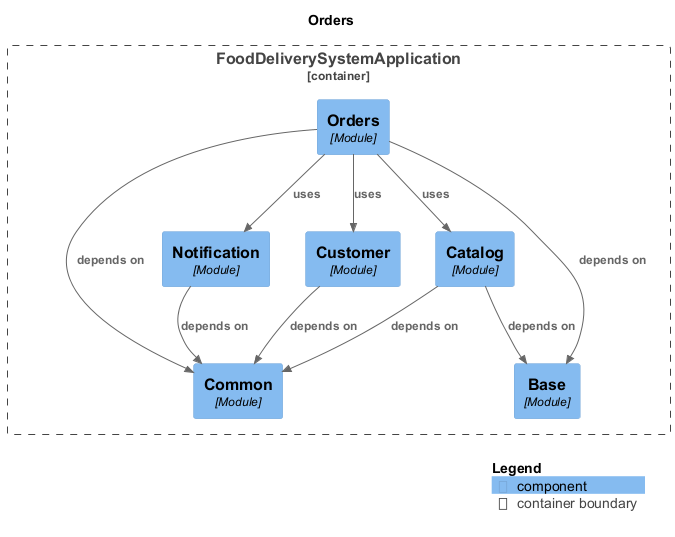
Now, running mvn generate-resources will transform those text files into ready-to-use images. Here is the resulting diagram for my Orders module at target/spring-modulith-rendered :
Module Communication
In a traditional monolithic system, classes usually call other methods directly to interact between components. However, when we look at microservices, communication typically falls into two categories:
- Synchronous: Using REST, GraphQL, or gRPC.
- Asynchronous: Using message brokers like Kafka or RabbitMQ.
The same principles apply to a Modular Monolith, but with a few important nuances:
- Synchronous communication is done via direct method calls, but only through exposed interfaces in the API package (ensuring we don’t violate our module boundaries).
- Asynchronous communication is achieved via Spring Application Events, or through a more robust implementation using Spring Modulith’s
@ApplicationModuleListener.
Using events helps isolate modules from each other, adhering to strict boundaries and vastly improving testability.
To publish an event, a module uses Spring’s standard ApplicationEventPublisher:
@Service
@RequiredArgsConstructor
public class OrderManagement {

  private final ApplicationEventPublisher events;

  @Transactional
  public void complete(Order order) {
    // State transitions on the order aggregate go here...

    // We publish the event inside the transaction
    events.publishEvent(new OrderCompleted(order.getId()));
  }
}
By marking the publisher method as @Transactional, we ensure that if the order state fails to save, the message is never sent.
On the receiving end, the @ApplicationModuleListener annotation is fantastic syntactic sugar. It replaces a lot of Spring boilerplate which are @Transactional, @TransactionalEventListener and @Async. For instance, this standard Spring setup:
@Component
class InventoryManagement {

  @Async
  @Transactional(propagation = Propagation.REQUIRES_NEW)
  @TransactionalEventListener
  void on(OrderCompleted event) { /* … */ }
}
Is exactly equivalent to this in Spring Modulith:
@Component
class InventoryManagement {

  @ApplicationModuleListener
  void on(OrderCompleted event) { /* … */ }
}
But what happens if the system crashes right after the order is saved, but before the listener can process the event? In a standard Spring app, that event is lost forever.
Spring Modulith’s Event Publication Registry
To solve the data loss problem, Spring Modulith implements the Transactional Outbox Pattern via its Event Publication Registry.
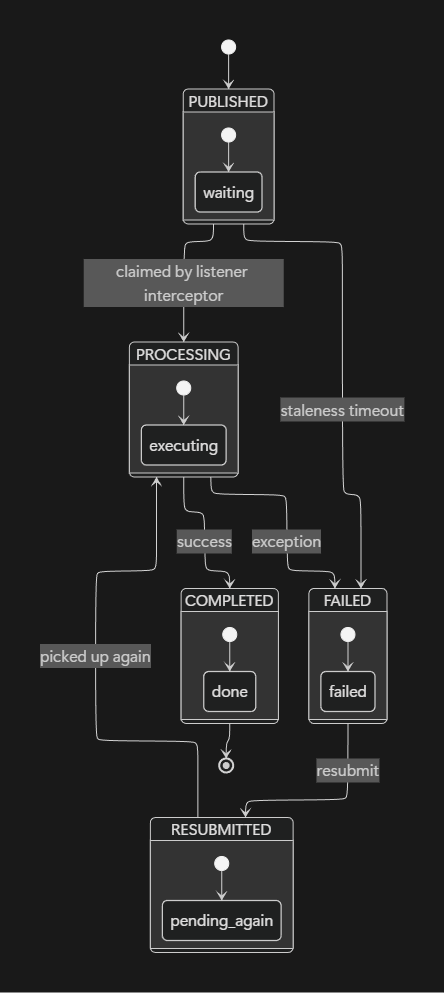
It automatically creates a database entry for each transactional event listener. An entry is marked as COMPLETED when the listener’s execution succeeds, or FAILED if something goes wrong. Since version 2.0, events track a rich lifecycle including states like PUBLISHED, PROCESSING, COMPLETED, FAILED, and RESUBMITTED.
So here’s a state diagram to see how your event navigates between states:
Let’s look at the database schema it creates (this example is for MySQL):
-- event_publication is required for durable module event delivery.
CREATE TABLE IF NOT EXISTS `event_publication` (
  `id` BINARY(16) NOT NULL,
  `listener_id` VARCHAR(512) NOT NULL,
  `event_type` VARCHAR(512) NOT NULL,
  `serialized_event` VARCHAR(4000) NOT NULL,
  `publication_date` TIMESTAMP(6) NOT NULL,
  `completion_date` TIMESTAMP(6) DEFAULT NULL,
  `status` VARCHAR(20),
  `completion_attempts` INT,
  `last_resubmission_date` TIMESTAMP(6) DEFAULT NULL,
  PRIMARY KEY (`id`),
  INDEX `event_publication_by_completion_date_idx` (`completion_date`)
);
Two columns stand out here for failure recovery:
- Completion attempts: How often the listener was invoked.
- Last resubmission date: When the publication was last retried.
When a publication is marked as COMPLETED, we can control database bloat by setting the spring.modulith.events.completion-mode property to:
- update (default) — Sets the completion date on the entry.
- delete — Automatically removes the completed entry.
- archive — Moves the completed entry to an
event_publication_archivetable to keep the main table small.
In case you decided to archive COMPLETED events, you’d need to add archive table:
CREATE TABLE IF NOT EXISTS `event_publication_archive` (
  `id` BINARY(16) NOT NULL,
  `listener_id` VARCHAR(512) NOT NULL,
  `event_type` VARCHAR(512) NOT NULL,
  `serialized_event` VARCHAR(4000) NOT NULL,
  `publication_date` TIMESTAMP(6) NOT NULL,
  `completion_date` TIMESTAMP(6) DEFAULT NULL,
  `status` VARCHAR(20),
  `completion_attempts` INT,
  `last_resubmission_date` TIMESTAMP(6) DEFAULT NULL,
  PRIMARY KEY (`id`),
  INDEX `event_publication_archive_by_completion_date_idx` (`completion_date`)
);
Depending on the dialect you use, you may need to take a look at the docs appendix for more info.
Handling Crashes and Stale Events
If the system crashes, events might be left hanging. Spring Modulith provides a Staleness Monitor (since 2.0) that runs a scheduled task to flip these abandoned events to FAILED based on configurable timeouts (e.g., spring.modulith.events.staleness.published).
Once events are marked as failed, we can use management beans like FailedEventPublications to programmatically clean up or retry them. Here is a simple housekeeping scheduler I created for the system:
@Component
@RequiredArgsConstructor
class PublicationHousekeeping {

  private final CompletedEventPublications completed;
  private final FailedEventPublications failed;

  @Scheduled(cron = "0 0 * * * *") // Every hour
  void purgeOldCompleted() {
    completed.deletePublicationsOlderThan(Duration.ofDays(7));
  }

  @Scheduled(fixedDelay = 60_000) // Every minute
  void retryFailed() {
    failed.resubmit(
        ResubmissionOptions.defaults()
            .withBatchSize(50)
            .withMinAge(Duration.ofMinutes(5))
    );
  }
}
Enough with theoretical concepts, let’s see how the Orders module would interact with Notification module after refactoring.
@Service
@RequiredArgsConstructor
class OrderService {
  private final ApplicationEventPublisher events;

  @Transactional
  public void placeOrder(Long orderId, Long customerId, String email) {
    // persist order...
    events.publishEvent(new OrderPlacedEvent(orderId, customerId, email));
  }
}
When an order is placed, after processing it, an event is published to an internal listener in Notification module.
@Service
@RequiredArgsConstructor
class OrderPlacedEventListener {

  private final NotificationRepository notificationRepository;
  private final ApplicationEventPublisher events;

  @ApplicationModuleListener
  public void onOrderPlaced(OrderPlacedEvent event) {
    Notification n = notificationRepository.save(
        Notification.pending(event.customerId(), event.email(), "Order placed successfully"));
    events.publishEvent(new NotificationCreatedEvent(n.getId(), n.getEmail(), n.getMessage()));
  }
}
@Service
@RequiredArgsConstructor
class NotificationListener {
private final NotificationRepository notificationRepository;
private final EmailSender emailSender;
@ApplicationModuleListener
public void onNotificationCreated(NotificationCreatedEvent event) {
Notification n = notificationRepository.findById(event.notificationId()).orElseThrow();
try {
emailSender.send(event.email(), "Order update", event.message());
n.markSent();
} catch (Exception ex) {
n.markFailed();
}
notificationRepository.save(n);
}
}I’ve split the notification listener from the order listener. By splitting this, high fault tolerance is therefore achieved. If the email server (or any other channel) is down, the NotificationCreatedEvent will fail in the registry and can be retried later, while the OrderPlacedEvent is already marked as COMPLETED because the intent was successfully saved.
# Modulith resilience config
spring:
  modulith:
    events:
      republish-outstanding-events-on-restart: true
      completion-mode: archive
A quick note here: While the snippets above are simplified, the actual implementation uses the Strategy and Factory design patterns. This allows the system to dynamically choose between notification channels (Email, SMS, Push) at runtime without changing the core listener logic.
You may wonder, what’s the point of storing the notification? @ApplicationModuleListener’s behavior basically serves as an infrastructure for your events throughout the system. So it helps in monitoring the state of any events published in your system and how you handle them.
Back to the example earlier, each event dispatched is first added to event_publication and once it’s done, depending on how you deal with COMPLETED events, it’s moved automatically to the archive table which will look like this:
| event_type | serialized_event | publication_date | completion_date |
|---|---|---|---|
| com.joe.abdelaziz.foodDeliverySystem.notification.api.event.NotificationCreatedEvent | {“notificationId”:11,“userId”:4,“channelType”:“EMAIL”,“message”:“Your order with id 15 has been placed successfully!”,“order”:{“id”:15,“status”:“PENDING”,“estimatedDeliveryDate”:“2026-04-09T13:20:30.0297058”,“orderTotal”:0,“totalDeliveryFees”:70.00,“lineItems”:[{“name”:“Margherita”,“quantity”:1,“unitPrice”:120.0,“optionsTotal”:65.0},{“name”:“Garlic Bread”,“quantity”:1,“unitPrice”:55.0,“optionsTotal”:0},{“name”:“Cola”,“quantity”:1,“unitPrice”:25.0,“optionsTotal”:0},{“name”:“Classic Burger”,“quantity”:2,“unitPrice”:110.0,“optionsTotal”:10.0}]}} | 2026-04-09 10:15:30.396320 | 2026-04-09 10:15:33.523440 |
| com.joe.abdelaziz.foodDeliverySystem.orders.api.event.OrderPlacedEvent | {“customerId”:4,“customerEmail”:“test@gmail.com”,“customerPhone”:“01234455667”,“order”:{“id”:15,“customerId”:4,“promotionId”:null,“promotio….. Truncated for simplicity | 2026-04-09 10:15:30.219187 | 2026-04-09 10:15:30.431481 |
Final thoughts
Spring Modulith sits on top of Spring Boot and makes modular monoliths practical instead of theoretical. It gives you a way to define boundaries, verify them, document them, and communicate across them without turning your codebase into a free-for-all.
Used well, it lets you keep the simplicity of a monolith while getting many of the structural benefits people usually chase with microservices.